

SEARCH
BY LANE
Enter pickup, drop-off, and equipment to find carriers connected to that lane.
Search carrier capacity by lane, equipment, availability, and carrier details so you can find the right match for your freight.
Search carriers by freight details, filter the results, and open carrier profiles before you reach out.
Enter pickup, drop-off, and equipment to find carriers connected to that lane.

Narrow results by radius, age, favorites, onboarded carriers, GPS, authority, team drivers, and LTL.

Open carrier profiles to review contact details, ratings, authority, insurance, equipment, and operating areas.
Capacity Finder shows matching carriers with sorting, filters, and detailed carrier profiles.
 Sort by freshnessSee when carrier activity was last updated and sort results by age.
Use broker filtersFilter by favorites, onboarded carriers, GPS, active authority, team drivers, and LTL.
Open carrier profilesReview carrier details, operating areas, ratings, insurance, authority, and contact options.
Sort by freshnessSee when carrier activity was last updated and sort results by age.
Use broker filtersFilter by favorites, onboarded carriers, GPS, active authority, team drivers, and LTL.
Open carrier profilesReview carrier details, operating areas, ratings, insurance, authority, and contact options.
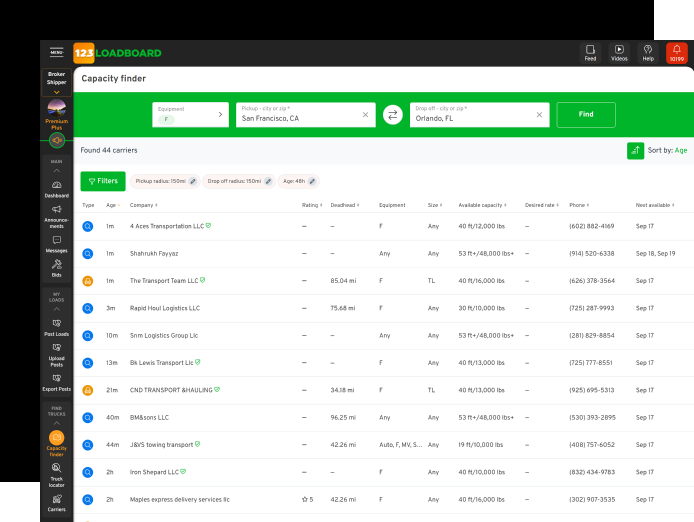
Capacity finder helps brokers search beyond a basic truck list. Use lane details, carrier activity, filters, and carrier profiles to find better matches for your freight.